Wednesday, 29 July 2015

#Windows10 Review

I just installed #Windows10 so far it is cool. Here's a short review. 


Upgrading to Windows 10


The best thing while upgrading is it didn't change anything which was previously installed. The data is also intact and just the way it was. so you don't have to worry about data while upgrading it.
Although having a backup is a good idea.

The update process took about one hour and few more minutes but after all it was an os installation. The update process was really Effortless I did almost nothing. The old Programs and Network settings weren't changed. Just the Lockscreen was changed and no major change anywhere. So go ahead and update.


The UI

the User interface is really nice, playful, Transparent and most importantly stable at least on my device. 

The Icons for folders and drives seem a little cartoonish and boxy. There's a new task view button on the taskbar and also a good wide search box which is working great and the windows search is better than before. 

We can add A virtual desktop. 

Managing the open apps is quite easy. 
Working in multiple windows at once is also easy just press the windows key and the suitable arrow key for ex if you press windows+up it will shift the current window to up. 

The charms bar has been completely removed. and a notification center is added.
Which will display all the notifications like mail and other things along with quick shortcuts to toggle WiFi and Bluetooth settings etc .


Cortana

It really is a brilliant feature. Named after the character from the Xbox video game halo if you ask her she will answer. rather than the older speech recognition this one is far better. a significant improvement can be seen. It is smart as well. It is really good but still not as good as apple's Siri.It will tell you about what she can do. She because of the female voice although if you ask Cortana her gender she will say she is a cloud-based program.  

You can change what it calls you by typing in the name while setting up Cortana. To change it later on click on the search and then on the notebook icon Then in About me you can change what it calls you.

A bad news is that it is not available in India yet. but don't need to be sad you can still use it by tricking the system by changing the system language to US English and region to the United States. or to any  other suitable language and region. Although a few problems might arise in some other apps like in the store while making an app purchase. 


Edge

The New Browser is really significantly faster than IE. The improvement in the speed is quite noticeable. And it might give a tough competition to google chrome. The browser is also well designed. It is fast fluid and responsive. 


The start

The start looks good but if you were used to the start in the windows 8 you might feel it a little uneasy. but after using it for a while it won't be a problem. it is well organized though you can change the size of it easily. it is like the combination of the windows 7 start menu and the windows 8 start menu.You can also make it full screen like it was in the windows 8.


Overall experience is really great please upgrade and give it a try. if you don't like it you can always go back. 

Confused about Your Career ? Try this free and Simple Personality test.

While surfing the internet i found this amazing website which tells you what type of person you are there are 16 diffrent types of persnality scientificaly this site will take an Test not a long test and a really simple test. 

The result will be immeditly displayd to you it will be clear in the results that what type of person you are what qualities you have. and there are links which will tell you about how you behave in work place or with friends your relationship problems or what type of person you may like. And it will also describe which career path will suit you best. But don't worry this are just the predictions based on the type of personalities which by the way are 16 you can read about them here. Depending upon the personality the site will predict what you will or  be good at. 

I found that the results are quite true and seem to be precise. The test is free Take it here. 
The test doesn;t requires you to sign up or login. 
There are also preimum profile if you want more for 32$ with payback if you are not satisfied. 


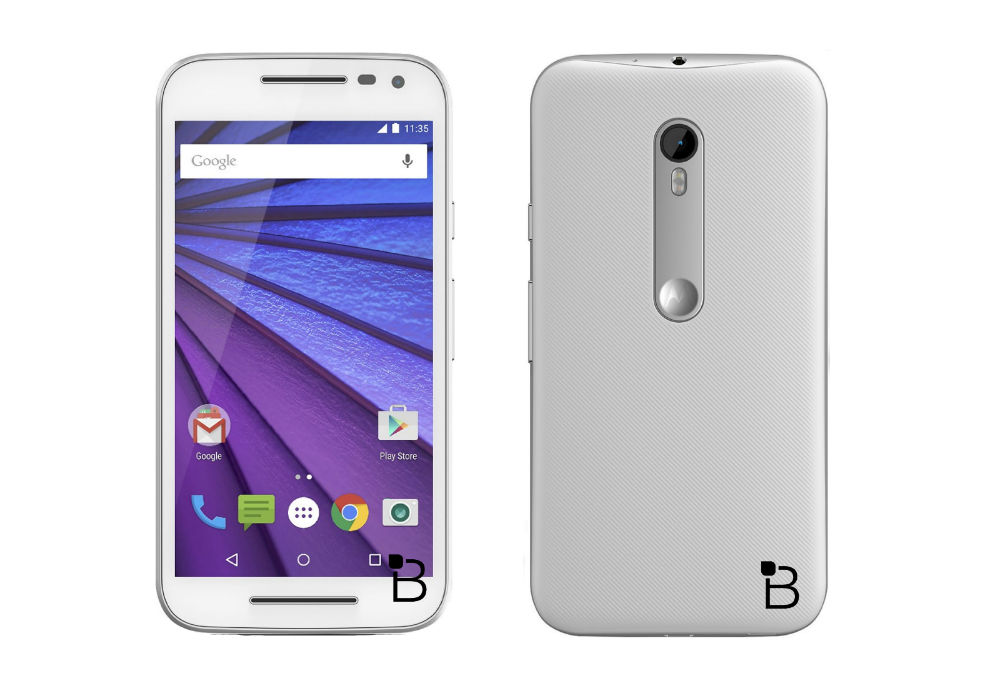
Motorola Moto G 3rd Gen Specifications.

The powerful Moto G3 now available for sale o flipkart at just  Rs.12,999 and 11,999. in two colors Black and white the phone has really powerful Specifications. And The best thing is it is water resistant up to one meter and for 30 minutes. All this in a very low price. Along with great deals on Flipkart. Detailed Specs given below. 


NETWORK
Technology
GSM / HSPA / LTE

LAUNCH
Announced 2015, July

Status Available. Released 2015, July

BODY
Dimensions 142.1 x 72.4 x 11.6 mm (5.59 x 2.85 x 0.46 in)
Weight 155 g (5.47 oz)
SIM Optional Dual SIM (Micro-SIM, dual stand-by)
IPX7 certified - water resistant up to 1 meter and 30 minutes

DISPLAY
Type IPS LCD capacitive touchscreen, 16M colors
Size 5.0 inches (~67.0% screen-to-body ratio)
Resolution 720 x 1280 pixels (~294 ppi pixel density)
Multitouch Yes
Protection Corning Gorilla Glass 3

PLATFORM
OS Android OS, v5.1.1 (Lollipop)
Chipset Qualcomm MSM8916 Snapdragon 410
CPU Quad-core 1.4 GHz Cortex-A53
GPU Adreno 306

MEMORY
Card slot microSD, up to 32 GB
Internal 8 GB, 1 GB RAM
16 GB, 2 GB RAM

CAMERA
Primary 13 MP, 4128 x 3096 pixels, autofocus, dual-LED (dual tone) flash
Features Geo-tagging, touch focus, face detection, panorama, auto-HDR
Video 1080p@30fps, HDR
Secondary 5 MP, auto-HDR

SOUND 
Alert types Vibration; MP3, WAV ringtones
Loudspeaker Yes
3.5mm jack Yes
COMMS WLAN Wi-Fi 802.11 b/g/n, hotspot

Bluetooth v4.0, A2DP, LE
GPS Yes, with A-GPS, GLONASS, Beidou
Radio FM radio

USB microUSB v2.0, USB Host

FEATURES
Sensors Accelerometer, proximity
Messaging, SMS(threaded view), MMS, Email, Push Email, IM
Browser HTML
Java No
 Active noise cancellation with dedicated mic
- MP3/AAC+/WAV/Flac player
- MP4/H.264 player
- Photo/video editor
- Document viewer

BATTERY
Non-removable Li-Ion 2470 mAh battery
Stand-by
Talk time

COLORS
Black, White


The above information may not be 100% Correct.

Sunday, 31 May 2015

Storing,Organizing,Searching Photos and Videos Now easy And effortless!

Now you don't have to worry about losing pictures or videos getting lost. Google Photos is a great solution to store all the photos and videos on the cloud. 

Google has announced Free unlimited storage of Photos and Videos on Google Photos. The photos must be up to 16 MP and videos up to 1080p will be allowed to save for free and unlimited fully free of cost without quality loss.


Stay Synchronized.
Now you can upload as many pictures as you want. Not only you can store pictures and videos on the cloud but the photos will be synced with all your devices including your I-Phones and I-Pads And of course your Android devices. All you need is to have Google Photos installed on you phone. 

The Search.

The searching is easy as well. Now you don't need to scroll and scroll to find one photo that you wanted to see or share.
The searching is so easy that if you are searching for a photo took at a beach just type beach in the search bar and you will get all the photos clicked at a beach.Even if they are stored on your device locally or not.you can search for photos taken at a basketball game or photos of your dog etc. just type basketball or dog.

Create Animations and Montages 

You can eaisly select few images add them up to make an animation you can alos add an Souondtrack of your choice. You can create montages and animations and you can share them whereveer you want.

Effortless Organisation.
Organizing is also easy with google photos. it will automatically sort the Photos and Videos according to the date. if you pinch out in the photos app it will show photos week wise if you pinch out even more it will show photos month wise so on and vice versa. 
 
Another interesting thing is it can also show you photos people wise, google will automatically recognize the faces in your photos and when you will click on a persons profile you will get all the photos you had clicked with him and you don't need to do a thing you Don't even need to tag people it will do it automatically.

Editing And Sharing.

You can also edit the photos and share them any way you want it.

All of this You do Will be synced to every device so you can acsess the photos whenever and wherever you want. Without losing a single picture.

So now store life time of you memories without losing them or having to worry about managing them google will do it for you.


Thursday, 14 May 2015

Work late at night on Computer and your eyes are hurting? The solution is here

Most of the people work late on computers or laptops or some people just chat all night on smartphones and they all end up having an irritation in eyes and sometimes a headache in morning and other problems.

The computer screen emit a lot of blue light which is irritating at night. and it is said that this blue light is not at all good for human eyes this blue light can cause headache and it also disturbs the sleep if you look at it just before you sleep. And that is the reason you get a headache when you work late at night on a computer or any screen for that matter.

The solution to this is a small software called Flux.you can download it here.

This software will automatically adjust the screen throughout the day so that the screen won't hurt your eyes. the software reduces the blueness at night.
It will recognize you location and then act accordingly.

This software is available for free and is available on all windows versions, Mac OS, I phone, I pad, Linux 

At the start you will not like the way your screen will look after installing it but give it some time you will get use to it and then try disabling flux you will see how the screen will hurt your eyes.
This software also haves a movie mode you might wanna use that while watching videos.

Warning :- A little warning disable this software if you are doing any color work like editing images in Photoshop doing color corrections or any type of graphical work.