Showing posts with label iOS. Show all posts

Thursday, 14 May 2015

Work late at night on Computer and your eyes are hurting? The solution is here

Most of the people work late on computers or laptops or some people just chat all night on smartphones and they all end up having an irritation in eyes and sometimes a headache in morning and other problems.

The computer screen emit a lot of blue light which is irritating at night. and it is said that this blue light is not at all good for human eyes this blue light can cause headache and it also disturbs the sleep if you look at it just before you sleep. And that is the reason you get a headache when you work late at night on a computer or any screen for that matter.

The solution to this is a small software called Flux.you can download it here.

This software will automatically adjust the screen throughout the day so that the screen won't hurt your eyes. the software reduces the blueness at night.
It will recognize you location and then act accordingly.

This software is available for free and is available on all windows versions, Mac OS, I phone, I pad, Linux 

At the start you will not like the way your screen will look after installing it but give it some time you will get use to it and then try disabling flux you will see how the screen will hurt your eyes.
This software also haves a movie mode you might wanna use that while watching videos.

Warning :- A little warning disable this software if you are doing any color work like editing images in Photoshop doing color corrections or any type of graphical work. 

Saturday, 14 September 2013

Touch ID: Apples fingerprint scanner on Apple's iPhone 5s How It Works.


Apple unveiled the new iPhone 5s and iPhone 5c at a special event held at its headquarters in Cupertino. While the iPhone 5c did not live up to its promise of being a 'low-cost iPhone', the iPhone 5s showed off some promising innovations, like the new Apple A7 chip and, perhaps the highlight of the event, a built-in fingerprint scanner called Touch ID.
Touch ID can be used to unlock the phone, by simply placing a finger on the Home button. It can also be used to confirm purchases made on the App Store, iBookstore or the iTunes Store.
You can scan and add multiple fingerprints (e.g. left and right thumbs, as well as index fingers), including those from multiple people (e.g. your wife or kids), and Touch ID will authenticate based on any of stored prints.
In case you are worried about privacy, Apple assures that fingerprints are encrypted and stored in a secure area inside the new A7 chip. Fingerprints are not accessible to any third-party apps, and nor are they sent to Apple's servers or backed onto iCloud.
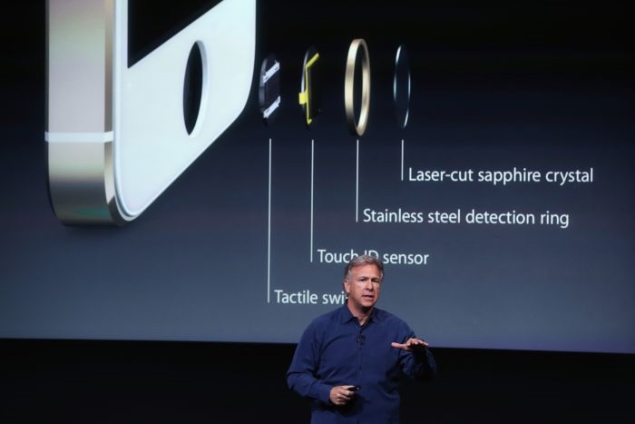
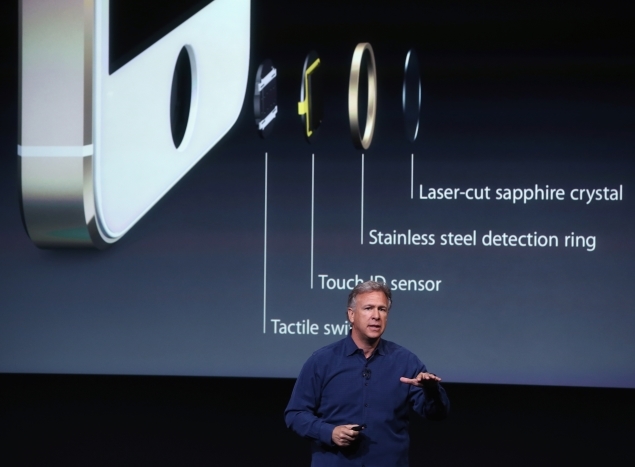
So what's the technology behind Apple's latest innovation? The Touch ID capacitive sensor embedded in the Home button scans your finger at 500ppi resolution to get a high resolution image of your finger. The sensor embedded in the Home button is just 170 microns thin.
The new Home button is made out of sapphire crystal, one of the "clearest, hardest" materials out there. The Home button protects the fingerprint sensor and also acts as a lens to precisely beam your fingerprint to the scanner. The Home button is surrounded by a steel ring, that can detect touches and tell Touch ID to start scanning when a finger is placed.
The sensor uses advanced capacitive touch to take high-resolution image of the sub-epidermal layers of your skin. The resultant image is then analysed, and grouped into one of three fingerprint types: Arch, Loop or Whorl. It then analyses ridges and other details too small for the human eye to see, to come up with a match for one of the stored fingerprints.
Update: Apple has reiterated that it stores only encrypted 'fingerprint data' obtained from the process detailed above and not the actual fingerprint image downplaying concerns of the iPhone 5s storing biometric data.
Apple also told WSJ that "customers who wish the use Touch ID also have to create a passcode as a backup. Only that passcode (not a finger) can unlock the phone if the phone is rebooted or hasn't been unlocked for 48 hours. This feature is meant to block hackers from stalling for time as they try to find a way to circumvent the fingerprint scanner."
Here is a link of video of Touch Id


Plz comment on the posts that you read and give your important feedback to us.
plz follow the blog if you liked it and also tell any suggestions or changes that should been done the blog Thanks for your support plz stay tuned for latest news and the tips and the tricks.


iOS 7: First impressions


One of the best things about Apple's latest iPhones is the slick new iOS 7 software that runs the devices. But that souped-up operating system could end up hurting sales because the free software upgrade will also work on iPhones released since 2010, giving owners of the older models less incentive to buy Apple's newest products.
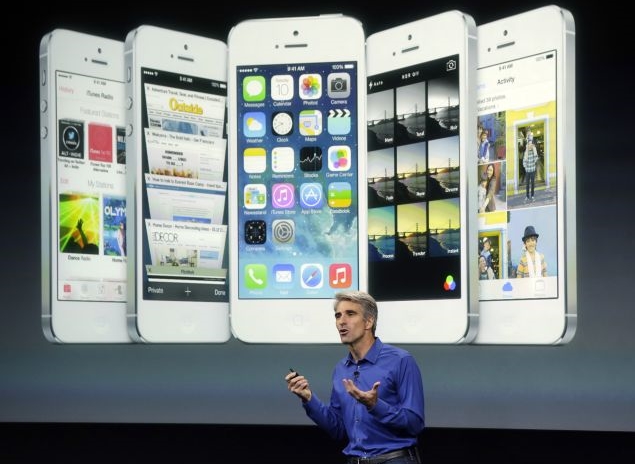
Perhaps unwittingly, even Apple's software boss Craig Federighi alluded to this potential problem while he was bragging about iOS 7 at the company's unveiling of its new phones Tuesday. He predicted that anyone who elects to install the software will feel "like they're getting an all-new device."

I understood what Federighi meant once I was able to see the iOS 7's improvements in action on Apple's two new iPhones, the iPhone 5c and the iPhone 5s. Although Apple announced iOS 7 at a conference three months ago, Tuesday marked the first time the company allowed reporters to experience the software hands-on.
Although the iPhone 5c is less expensive than its predecessor, the iPhone 5, iOS 7 almost made it look fancier than previous generations. As an iPhone 5 owner, I was feeling a bit envious until I remembered that I'll be able to spiff up my device, too, when the software is released on Sept. 18. The operating system will work on the iPhone 4 and later models, iPad 2s and subsequent versions, and the iPod Touch that came out late last year.

iOS 7 looks much different than previous versions of the operating system because it no longer displays iPhone apps as three-dimensional, embossed objects meant to mirror their real-world counterparts. The icons instead are flatter and more colorful.


Any significant change in design typically upsets users familiar with the old way of doing things, but I suspect the complaints about iOS 7 will be muted unless there are some terrible bugs in the software that weren't evident during the brief time that I was given to experiment.
I am fairly certain most people who download iOS 7 are going to be pleased. The software makes it easier to navigate around an iPhone and adds some compelling new features.

The additions include the ability to stream music through an advertising-supported service called iTunes Radio and five free apps that used to cost consumers anywhere from 99 cents to $4.99 apiece. The free apps are Apple's photo-editing tool, iPhoto, and video-editing program, iMovie, as well as work-oriented apps called Pages, Numbers and Keynote.
Apple doesn't appear to be removing any popular apps built into the operating system, as best as I could tell. The company did that last year when it replaced Google's mapping app with its own navigation system only to be ridiculed for misguiding users with shoddy directions. Apple isn't bringing back Google Maps with iOS 7, but it is promising that its alternative is getting better.
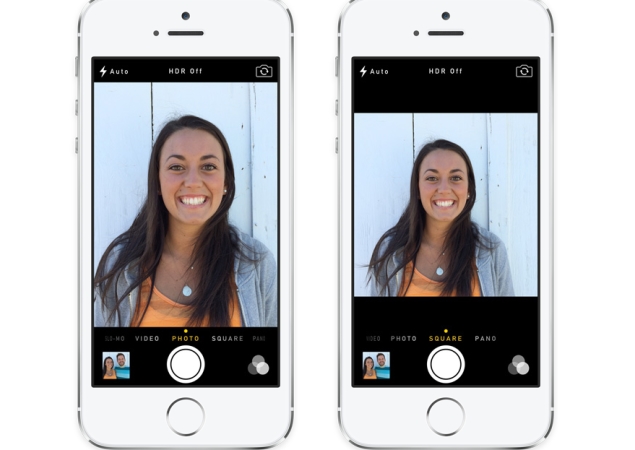
The software upgrade also will make it easier to take better pictures on the iPhone and automatically sort photos into different categories to denote particular events. I particularly liked a feature that lets you control how the camera operates by toggling between options at the bottom of the screen with the swipe of a finger. Once the camera is open in IOS 7, the choices include taking a square, panoramic or standard photo. The bottom-of-the screen controls also include an option to switch to video mode.


When taking a picture in iOS 7, photographers can also choose a filter to use as they snap the photo rather than waiting to touch up the shot later. When shooting video, shots can be zoomed in while recording. I can't do any of that on my iPhone 5 because it is still powered by iOS 6.
The new system also empowers users to access other open apps more easily by clicking twice on the home button. When you do that, the apps are displayed as tiles that can be scrolled across horizontally so you can more easily see and choose several of them.
Apple is also making it easier to access frequently used controls such as and airplane mode by enabling users to pull up the panel from the bottom of the display screen instead of finding and pressing a settings option.
Other than the new software, the iPhone 5c isn't anything special, as one might expect from a cheaper phone.

The only thing that really distinguishes the 5c from the iPhone 5 is that it's housed in plastic instead of aluminum. Some consumers will no doubt like the plastic alternative because it comes in five colors: green, blue, yellow, pink and white. The price also may be more appealing, with the 5c starting at $99 with a two-year wireless contract, a $100 discount from iPhone models released in previous years.
A higher-end iPhone dubbed the 5s boasts several advantages that aren't available on any other model. The coolest innovation allows you to use your fingerprint to unlock the iPhone 5s instead of relying on a four-digit code that has to be repeatedly typed in. The fingerprint reader can also be used to access Apple's apps and iTunes store instead of a password.

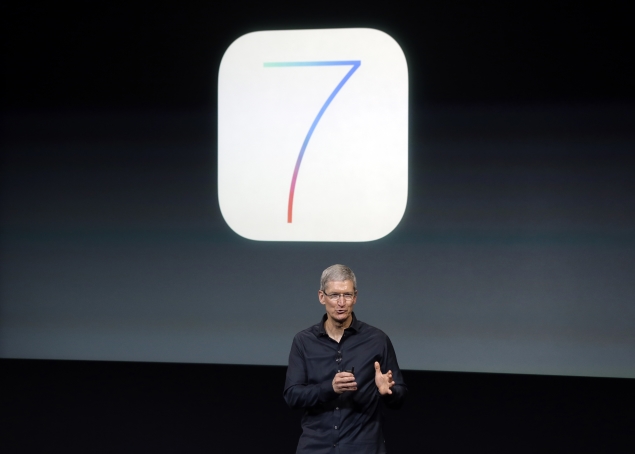
Apple CEO Tim Cook thinks the fingerprint scanner will revolutionize technology security. "There is going to be a whole new generation of kids who grow up not knowing what a password is," Cook predicted during a brief discussion with a small group of reporters after he left the room where Apple was demonstrating its new iPhones.


I found the fingerprint scanner, called "Touch ID," simple to use during my brief test of the 5s. It just took less than a minute for the phone to record the fingerprint on my thumb, instructing me along the way. Once my prints were in the phone's memory bank, all I had to do was lightly press on the home button when the 5s was locked in sleep mode and it quickly opened.
The 5s also contains a faster processor and technological wizardry designed to take sharper pictures and even record slow-motion video.
Best of all, though, the 5s comes with the iOS 7. I am already looking forward to downloading the software next week so I can simulate what it's like to have a new iPhone for free.

Plz comment on the posts that you read and give your important feedback.
and plz follow the blog if you liked it thanks for your support plz stay tuned for latest tech news tips and tricks. 


Tuesday, 3 September 2013

Twitter Updates Android, iOS And Web With New Conversation View, Abuse Reporting.

Twitter has just released an update for iOS, Android and the web application with a brand new interface for conversations, as well as enhanced sharing and abuse reporting capabilities. According to the official blog post, the idea is to make it easier to follow and discover conversations.

With the updates, users will see full conversations in their timeline as opposed to standalone @replies that may be sent hours or even days after the original tweet (the conversation starter) was sent.

This always allowed for strange, context-free tweets in the consumption experience, but with the new update users will have a bit more understanding of what's being tweeted back in forth in a conversation.

Conversations are shown with a blue vertical line between them, with the first tweet in a conversation appearing on top, chronologically. If there are more than two replies, you can click into the blue line to see all the replies in that conversation.

This is a pretty major update to the way that Twitter works and is fundamental to getting a larger demographic on a social network that can be pretty scary and unfamiliar at first.

But that's not all. The update also lets you share conversations via email, as well as the ability to share individual tweets by email on either iPhone or Android. Android users even have the benefit of sharing tweets via PM within Twitter.

Past the conversations revamp, Twitter has also included the ability to report individual tweets for abuse or spam directly from the web and Android apps, which was previously unavailable. The feature, which has been available on iPhone for quite a while, will roll out slowly.

The updates are available now in the Apple App Store and Google Play.

Bug In Apple’s CoreText Allows Specific String Of Characters To Crash iOS 6, OS X 10.8 Apps.

A bug in Apple's CoreText rendering engine in iOS 6 and OS X 10.8 causes any apps that try to render a string of Arabic characters to crash on sight. The string of characters which can trigger the bug — which was discovered yesterday and has spread around the hacking and coding community — has made its way to Twitter, where even looking at it in your timeline will crash the app.

In fact, because it's a CoreText bug, any apps that access this font framework to render text are affected. This means that any apps that use WebKit like Safari are also affected because WebKit uses CoreText.

This is a picture of the string of characters, not replicated here for obvious reasons:

If you'd care to experience the bug for yourself, feel free to seek out the tweet in the pic above, I'm not posting a link. For the record: Tweetbot appears to be immune to this, though it also uses the CoreText engine.

The characters were discovered and posted on a Russian site yesterday morning. The site claims that Apple has known about the problem for 'six months' and has not reacted. The posting includes a request to click the crash report button on any apps affected and report it to Apple.

The issue affects apps on iOS 6 and OS X 10.8 but does not work on OS X 10.9 Mavericks and iOS 7 beta releases. So whatever bug the characters are triggering, they've already been fixed in future releases of the engine. This doesn't help anyone still on iOS 6 of course.

The malicious possibilities are simple, if you send the characters in an SMS, it can initiate a revolving crash of Messages on both OS X and iOS. We confirmed this on both operating systems. You can also deliver the string of text via a web link.

Even worse, you can change the name of a wireless network to the characters and it will crash any device that scans that network to connect.