Showing posts with label Tech news. Show all posts

Thursday, 19 March 2015

Windows 10 All you need to know!

Windows have announced that its new version of windows will be shipped this summer not just for desktops but also for all other devices from smart phones to laptops.
Good news is that windows will be free for previous windows 8.1 and windows 7 users. And it is been said that it will also be available for free for pirated versions of windows.
Microsoft is trying to balance it for everyone.
Here’s a look of new windows 10.


What’s new?

There a lot of new features in the new windows
The amazing feature is the personal assistant Cortana.
The old Start is back. But you can switch to the full screen start menu if you want to.
All the store apps will open in the desktop mode with title bars and maximize and minimize buttons.
The charms haven’t been removed.
The Long ignored command prompt is also been improved.

The New Track pad Gestures 

Microsoft has worked also on the track pad gestures to improve the input methods.
as on laptops track pad is the basic input device and to make it easy to use Microsoft has added new gestures for precision track pads 
which are shown in the image.


The System Requirements for windows 10 desktop version will be as follows

1 GHz CPU
1 GB of RAM for 32 bit and 2 GB for 64 bit
16GB of storage space

The system requirements for smartphones and tablets will be as follows

3 Inch of minimum screen size
512 MB of RAM
4 GB of internal storage (at this limit also a microSD card slot)
Support for DirectX 9
The higher the resolution the higher the ram required will be.
If your device has 480 by 800 or 480 by 854 you will require at least 512 mb of RAM
For a 900 by 1,440 and 1,200 by 1,920 display resolution you will need at least 2GB of RAM and for a device having a 2k display will need 3GB of Ram.
Physical hardware buttons for power, volume up and volume down (in case of the lowest-supported-resolution -- 480 by 800 -- start, back and search buttons -- capacitive, given current designs -- are also needed)
The hardware requirements for buttons are consistent with those for Windows Phones.

Want to try it early?

The Technical preview of windows 10 is available here to download.
If you can run windows 8.1 or 8 without any problem then you can run windows 10 as well. This is just a technical preview by Microsoft and it is not a finished product it is sort of rough in some areas although mot of the functionality is implemented and a lot is to come. It is recommended that you backup everything first and then install the technical preview as It may crash while installing and may delete some of the files.
In order to use Cortana you must install the technical preview with US English Language.
The download instructions are in the link given above. 

Sunday, 1 March 2015

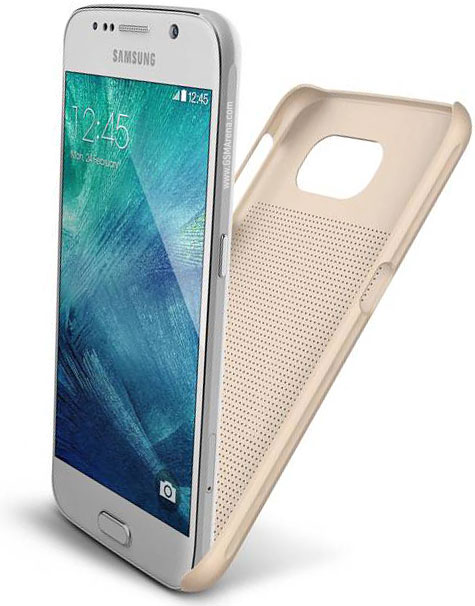
Samsung galaxy S6 going to be officially unveiled today! specifications here.

The event will be Starting at 12:30pm Eastern time on March 1, you'll be able to watch Samsung officially unveil the Galaxy S6 on YouTube as it occurs during Mobile World Congress in Barcelona.

The HTC one M9 will also be launching today the specs are available on this blog.

Here are complete specifications 


NETWORKTechnologyGSM / HSPA / LTE
LAUNCHAnnouncedExp. announcement 2015, March 1
StatusRumored. Exp. release 2015, Q1
BODYDimensions143.3 x 70.8 x 6.9 mm (5.64 x 2.79 x 0.27 in)
Weight-
SIMNano-SIM
 - Fingerprint sensor (PayPal certified)
- Samsung Pay (Visa, MasterCard, AMEX certified)
- IP67 certified - dust and water resistant
- Water resistant up to 1 meter and 30 minutes
DISPLAYTypeSuper AMOLED capacitive touchscreen, 16M colors
Size5.0 inches (~67.9% screen-to-body ratio)
Resolution1440 x 2560 pixels (~587 ppi pixel density)
MultitouchYes
ProtectionCorning Gorilla Glass 4
 - TouchWiz UI
PLATFORMOSAndroid OS, v5.0 (Lollipop)
ChipsetExynos 7420
CPUQuad-core 1.3 GHz Cortex-A53 & Quad-core 1.9 GHz Cortex-A57
GPUMali-T760
MEMORYCard slotmicroSD, up to 128 GB
Internal32 GB, 3 GB RAM
CAMERAPrimary20 MP, 4992 Ñ… 3744 pixels, optical image stabilization, phase detection autofocus, LED flash
FeaturesGeo-tagging, touch focus, face detection, HDR, panorama
Video2160p@30fps, 1080p@60fps, 720p@120fps, HDR, dual-video rec.
Secondary5 MP, 1080p@30fps, dual video call
SOUNDAlert typesVibration; MP3, WAV ringtones
LoudspeakerYes
3.5mm jackYes
COMMSWLANWi-Fi 802.11 a/b/g/n/ac, dual-band, Wi-Fi Direct, hotspot
Bluetoothv4.0, A2DP, LE, apt-X
GPSYes, with A-GPS, GLONASS, Beidou
NFCYes
Infrared portYes
RadioNo
USBmicroUSB v3.0 (MHL 3 TV-out), USB Host
FEATURESSensorsAccelerometer, gyro, proximity, compass, barometer, gesture, heart rate
MessagingSMS(threaded view), MMS, Email, Push Mail, IM
BrowserHTML5
JavaYes, via Java MIDP emulator
 - Wireless charging (Qi-enabled) - market dependent
- ANT+ support
- S-Voice natural language commands and dictation
- Smart stay, Smart pause, Smart scroll
- Air gestures
- Dropbox (50 GB cloud storage)
- Active noise cancellation with dedicated mic
- MP4/DivX/XviD/WMV/H.264 player
- MP3/WAV/WMA/eAAC+/FLAC player
- Photo/video editor
- Document viewer
BATTERY Li-Ion battery
Stand-by
Talk time
MISCColorsCharcoal Black, Copper Gold, Electric Blue, Shimmery White

Saturday, 14 September 2013

Touch ID: Apples fingerprint scanner on Apple's iPhone 5s How It Works.


Apple unveiled the new iPhone 5s and iPhone 5c at a special event held at its headquarters in Cupertino. While the iPhone 5c did not live up to its promise of being a 'low-cost iPhone', the iPhone 5s showed off some promising innovations, like the new Apple A7 chip and, perhaps the highlight of the event, a built-in fingerprint scanner called Touch ID.
Touch ID can be used to unlock the phone, by simply placing a finger on the Home button. It can also be used to confirm purchases made on the App Store, iBookstore or the iTunes Store.
You can scan and add multiple fingerprints (e.g. left and right thumbs, as well as index fingers), including those from multiple people (e.g. your wife or kids), and Touch ID will authenticate based on any of stored prints.
In case you are worried about privacy, Apple assures that fingerprints are encrypted and stored in a secure area inside the new A7 chip. Fingerprints are not accessible to any third-party apps, and nor are they sent to Apple's servers or backed onto iCloud.
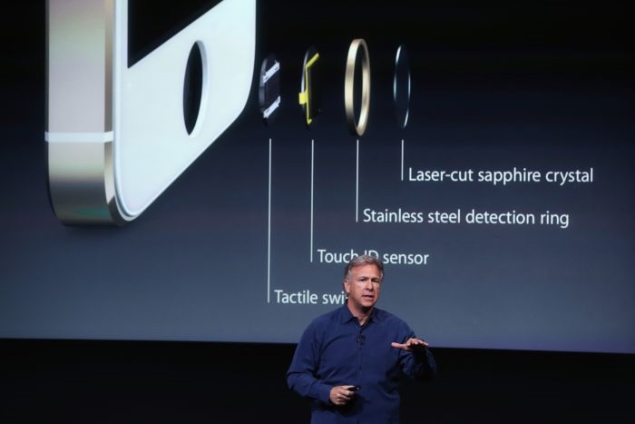
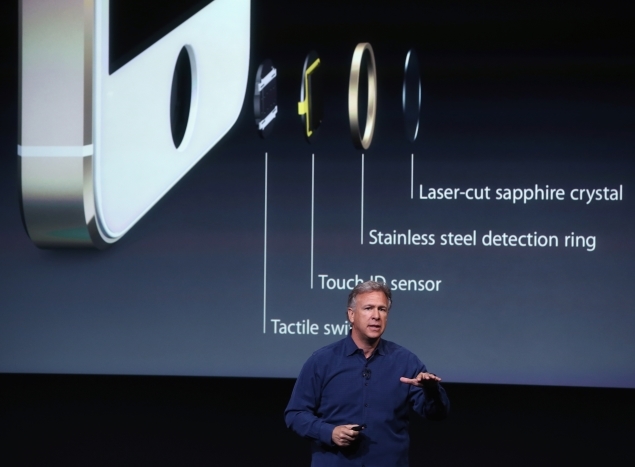
So what's the technology behind Apple's latest innovation? The Touch ID capacitive sensor embedded in the Home button scans your finger at 500ppi resolution to get a high resolution image of your finger. The sensor embedded in the Home button is just 170 microns thin.
The new Home button is made out of sapphire crystal, one of the "clearest, hardest" materials out there. The Home button protects the fingerprint sensor and also acts as a lens to precisely beam your fingerprint to the scanner. The Home button is surrounded by a steel ring, that can detect touches and tell Touch ID to start scanning when a finger is placed.
The sensor uses advanced capacitive touch to take high-resolution image of the sub-epidermal layers of your skin. The resultant image is then analysed, and grouped into one of three fingerprint types: Arch, Loop or Whorl. It then analyses ridges and other details too small for the human eye to see, to come up with a match for one of the stored fingerprints.
Update: Apple has reiterated that it stores only encrypted 'fingerprint data' obtained from the process detailed above and not the actual fingerprint image downplaying concerns of the iPhone 5s storing biometric data.
Apple also told WSJ that "customers who wish the use Touch ID also have to create a passcode as a backup. Only that passcode (not a finger) can unlock the phone if the phone is rebooted or hasn't been unlocked for 48 hours. This feature is meant to block hackers from stalling for time as they try to find a way to circumvent the fingerprint scanner."
Here is a link of video of Touch Id


Plz comment on the posts that you read and give your important feedback to us.
plz follow the blog if you liked it and also tell any suggestions or changes that should been done the blog Thanks for your support plz stay tuned for latest news and the tips and the tricks.


iOS 7: First impressions


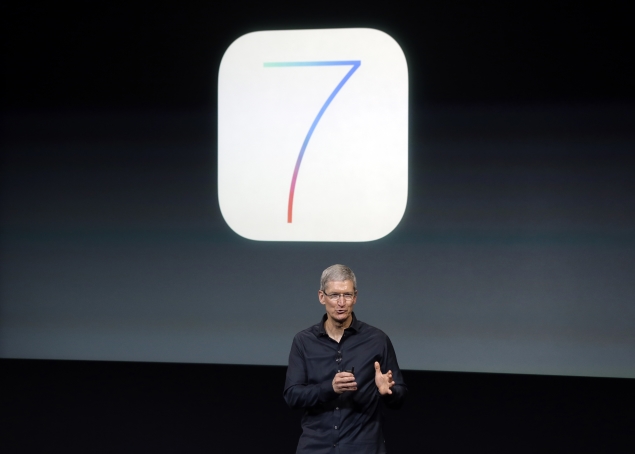
One of the best things about Apple's latest iPhones is the slick new iOS 7 software that runs the devices. But that souped-up operating system could end up hurting sales because the free software upgrade will also work on iPhones released since 2010, giving owners of the older models less incentive to buy Apple's newest products.
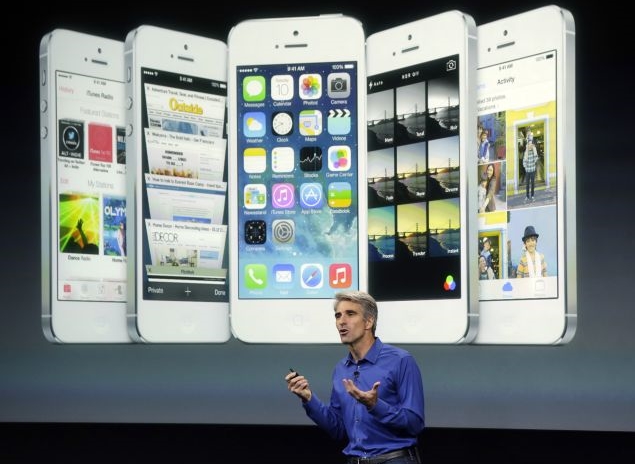
Perhaps unwittingly, even Apple's software boss Craig Federighi alluded to this potential problem while he was bragging about iOS 7 at the company's unveiling of its new phones Tuesday. He predicted that anyone who elects to install the software will feel "like they're getting an all-new device."

I understood what Federighi meant once I was able to see the iOS 7's improvements in action on Apple's two new iPhones, the iPhone 5c and the iPhone 5s. Although Apple announced iOS 7 at a conference three months ago, Tuesday marked the first time the company allowed reporters to experience the software hands-on.
Although the iPhone 5c is less expensive than its predecessor, the iPhone 5, iOS 7 almost made it look fancier than previous generations. As an iPhone 5 owner, I was feeling a bit envious until I remembered that I'll be able to spiff up my device, too, when the software is released on Sept. 18. The operating system will work on the iPhone 4 and later models, iPad 2s and subsequent versions, and the iPod Touch that came out late last year.

iOS 7 looks much different than previous versions of the operating system because it no longer displays iPhone apps as three-dimensional, embossed objects meant to mirror their real-world counterparts. The icons instead are flatter and more colorful.


Any significant change in design typically upsets users familiar with the old way of doing things, but I suspect the complaints about iOS 7 will be muted unless there are some terrible bugs in the software that weren't evident during the brief time that I was given to experiment.
I am fairly certain most people who download iOS 7 are going to be pleased. The software makes it easier to navigate around an iPhone and adds some compelling new features.

The additions include the ability to stream music through an advertising-supported service called iTunes Radio and five free apps that used to cost consumers anywhere from 99 cents to $4.99 apiece. The free apps are Apple's photo-editing tool, iPhoto, and video-editing program, iMovie, as well as work-oriented apps called Pages, Numbers and Keynote.
Apple doesn't appear to be removing any popular apps built into the operating system, as best as I could tell. The company did that last year when it replaced Google's mapping app with its own navigation system only to be ridiculed for misguiding users with shoddy directions. Apple isn't bringing back Google Maps with iOS 7, but it is promising that its alternative is getting better.
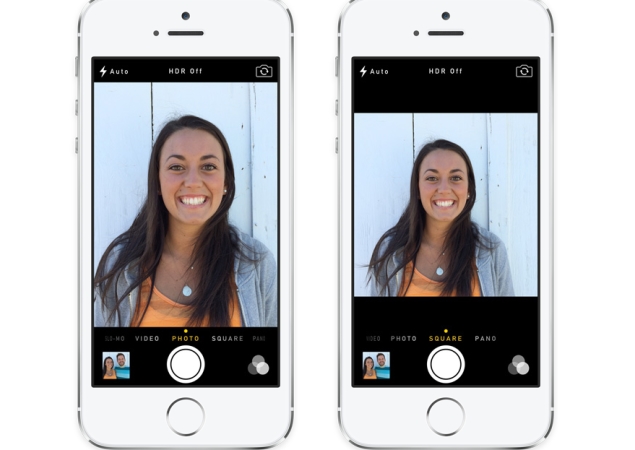
The software upgrade also will make it easier to take better pictures on the iPhone and automatically sort photos into different categories to denote particular events. I particularly liked a feature that lets you control how the camera operates by toggling between options at the bottom of the screen with the swipe of a finger. Once the camera is open in IOS 7, the choices include taking a square, panoramic or standard photo. The bottom-of-the screen controls also include an option to switch to video mode.


When taking a picture in iOS 7, photographers can also choose a filter to use as they snap the photo rather than waiting to touch up the shot later. When shooting video, shots can be zoomed in while recording. I can't do any of that on my iPhone 5 because it is still powered by iOS 6.
The new system also empowers users to access other open apps more easily by clicking twice on the home button. When you do that, the apps are displayed as tiles that can be scrolled across horizontally so you can more easily see and choose several of them.
Apple is also making it easier to access frequently used controls such as and airplane mode by enabling users to pull up the panel from the bottom of the display screen instead of finding and pressing a settings option.
Other than the new software, the iPhone 5c isn't anything special, as one might expect from a cheaper phone.

The only thing that really distinguishes the 5c from the iPhone 5 is that it's housed in plastic instead of aluminum. Some consumers will no doubt like the plastic alternative because it comes in five colors: green, blue, yellow, pink and white. The price also may be more appealing, with the 5c starting at $99 with a two-year wireless contract, a $100 discount from iPhone models released in previous years.
A higher-end iPhone dubbed the 5s boasts several advantages that aren't available on any other model. The coolest innovation allows you to use your fingerprint to unlock the iPhone 5s instead of relying on a four-digit code that has to be repeatedly typed in. The fingerprint reader can also be used to access Apple's apps and iTunes store instead of a password.

Apple CEO Tim Cook thinks the fingerprint scanner will revolutionize technology security. "There is going to be a whole new generation of kids who grow up not knowing what a password is," Cook predicted during a brief discussion with a small group of reporters after he left the room where Apple was demonstrating its new iPhones.


I found the fingerprint scanner, called "Touch ID," simple to use during my brief test of the 5s. It just took less than a minute for the phone to record the fingerprint on my thumb, instructing me along the way. Once my prints were in the phone's memory bank, all I had to do was lightly press on the home button when the 5s was locked in sleep mode and it quickly opened.
The 5s also contains a faster processor and technological wizardry designed to take sharper pictures and even record slow-motion video.
Best of all, though, the 5s comes with the iOS 7. I am already looking forward to downloading the software next week so I can simulate what it's like to have a new iPhone for free.

Plz comment on the posts that you read and give your important feedback.
and plz follow the blog if you liked it thanks for your support plz stay tuned for latest tech news tips and tricks.